
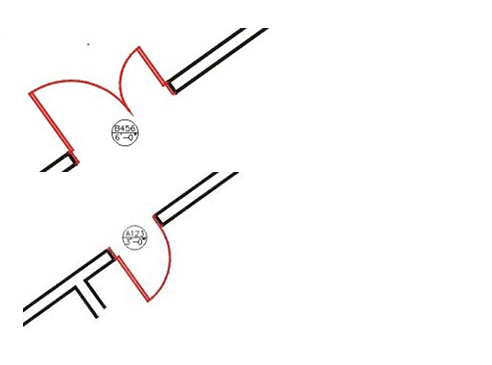
Drawing single and double doors in AutoCAD
How to draw doors with the single and double door utility
If you are looking for a fast method of drawing doors we recommended an add-on. This simple routine draws and insert doors in AutoCAD for you using 4 basic steps.
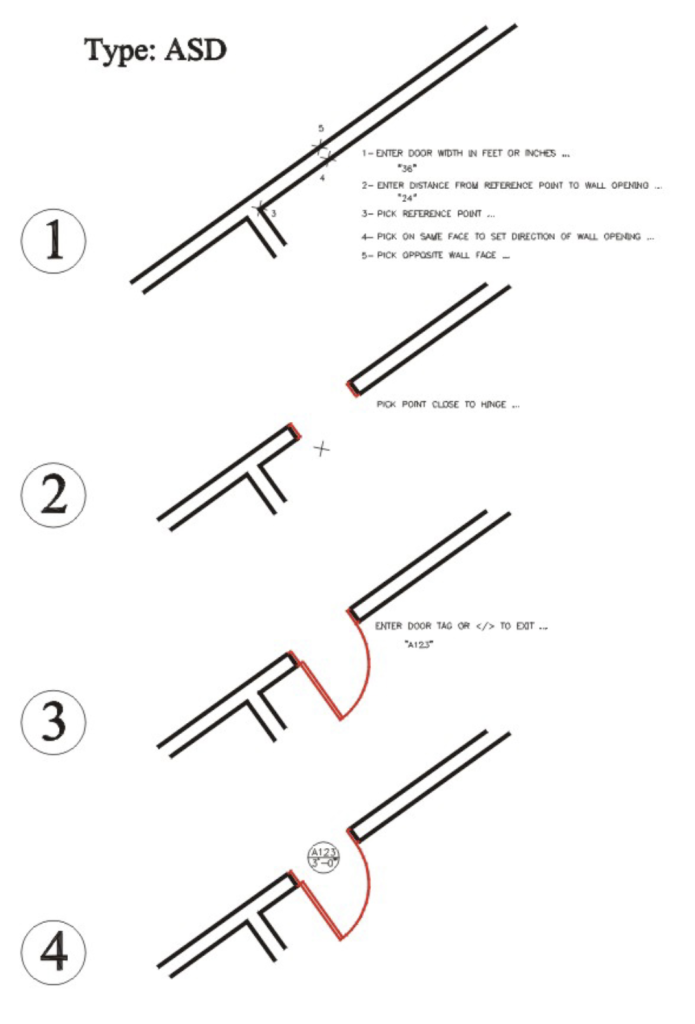
Here is an example of how to draw a door:
- Enter Door Width In Feet Or Inches Ie. 36 For 36 Inches
- Enter The Distance From The Reference Point To The Wall Opening Ie. “4”
- Pick Reference Point Ie. The Corner Where 2 Walls Meet
- Pick On Same Face To Set Ie. The Opening Side
- Pick Opposite Wall Face Ie. The Exterior Side
- Pick Point Close To Hinge
- Enter Door Tag
The routine will also draw double doors using the ADD command
Why use a routine to draw your doors?
Draw doors and trim within wall
Create a single and double doors at any angle. Walls are automatically trimmed as door inserts into wall.
See also PDF on how to create a door and tag
This AutoCAD add-on will also draw a door tag automatically – plus the door label created also retains size in feet, inches, and fractional inches as block attributes.
Breaks the wall and inserts tag
- “Breaks” the wall and draws doors with end caps.
- Inserts door tag
- Easily customize the tag if desired
- Draws single and double doors at any angle
- Creates 2” deep jambs, 1 ¾” deep door leaves, swinging arcs.
- Includes circular shape door tag insertion.
- For pair of doors, in case the leaves have different size, the routine allows the user to specify the size of the active leaf.
- Allows you to insert doors, jambs and symbol on different layers.
- Supports both Metric and Imperial (Standard US)
- Runs in latest version of AutoCAD Full Version

Creates block attributes – tag is easily customizable
This door routine also inserts a circular shape tag (defined in dr-type.dwg) which contains attributes such as door tag (typed by the user) and door width (in feet, inches and fractional inches) automatically added into the bottom portion of the bubble.
This block contains AutoCAD attributes which can be extracted with into a table (not included). The user can also customize and edit the tag shape simply by redefining the dwg file. The text size of the door label is set for working drawings on a scale of ¼”=1’. The text font can be set using the Autocad Text Style dialog box.